









Product Description
Protector your Apple MacBook Pro keyboard from wear with a thin rubber keyboard protector.
Check Compatibility
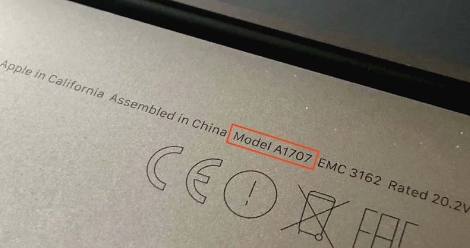
Check the on the bottom side of your laptop which will look something like "A1707"
| Year | Identifier | Model Number |
|---|---|---|
| Late 2016 15" (Touch Bar) | MacBookPro13,3 | A1707 (EMC 3072) |
| Late 2016 15" (Touch Bar) | MacBookPro13,3 | A1707 (EMC 3072) |
| Late 2016 15" (Touch Bar) | MacBookPro13,3 | A1707 (EMC 3072) |
| Mid-2017 15" (Touch Bar) | MacBookPro14,3 | A1707 (EMC 3162) |
| Mid-2017 15" (Touch Bar) | MacBookPro14,3 | A1707 (EMC 3162) |
| Mid-2017 15" (Touch Bar) | MacBookPro14,3 | A1707 (EMC 3162) |
Shipping Times and Services
United Kingdom (UK) Shipping
Europe Shipping
Global Shipping
Installation Guide
Watch or read our detailed installation guides which will teach you how to easily replace any keycap on your MacBook Pro A1707.
- Replacing Letters, Numbers and Special Character keycaps
- Replacing the Enter keycap
- Replacing the Command keycaps
- Replacing the Tab keycap
- Replacing the Delete keycap
- Replacing the Caps Lock keycap
- Replacing the Spacebar keycap
- Replacing the Up Arrow keycap
- Replacing the Down Arrow keycap
- Replacing the Shift Right keycap
- Replacing the Escape keycap
- Replacing the F1 - F12 and Power keycap
Rubber Keyboard Protector for MacBook Pro A1707
£9.99
Out of stock
Protector your Apple MacBook Pro keyboard from wear with a thin rubber keyboard protector.
United Kingdom (UK) Shipping
Europe Shipping
Global Shipping
Check Compatibility
Check the on the bottom side of your laptop which will look something like "A1707"
| Year | Identifier | Model Number |
|---|---|---|
| Late 2016 15" (Touch Bar) | MacBookPro13,3 | A1707 (EMC 3072) |
| Late 2016 15" (Touch Bar) | MacBookPro13,3 | A1707 (EMC 3072) |
| Late 2016 15" (Touch Bar) | MacBookPro13,3 | A1707 (EMC 3072) |
| Mid-2017 15" (Touch Bar) | MacBookPro14,3 | A1707 (EMC 3162) |
| Mid-2017 15" (Touch Bar) | MacBookPro14,3 | A1707 (EMC 3162) |
| Mid-2017 15" (Touch Bar) | MacBookPro14,3 | A1707 (EMC 3162) |
Watch or read our detailed installation guides which will teach you how to easily replace any keycap on your MacBook Pro A1707.
- Replacing Letters, Numbers and Special Character keycaps
- Replacing the Enter keycap
- Replacing the Command keycaps
- Replacing the Tab keycap
- Replacing the Delete keycap
- Replacing the Caps Lock keycap
- Replacing the Spacebar keycap
- Replacing the Up Arrow keycap
- Replacing the Down Arrow keycap
- Replacing the Shift Right keycap
- Replacing the Escape keycap
- Replacing the F1 - F12 and Power keycap
Video Installation Guide
Follow along with our video guide to easily replace your MacBook Pro A1707 keycaps.
Read Installation GuideRelated products
Product Reviews

Great service and product, very happy customer.
Quick, painless, and got exactly what I ordered. Will definitely use again when I need to.
Great customer support, very fast answer to your questions and totally Reliable. I recommend the "Mac Replacement Keys" to anyone who needs keys for computer.
Key is high quality and was shipped quickly. Only site I could find with this particular key in stock that would ship to the UK. Would definitely use them again
Perfect product and shipment to me in France!
Product is great, fits and works perfectly. Could usefully come with some fitting instructions, but there are YouTubes for that so no issues there. Would use again. Thanks!
Perfect product and shipment to me in France!
Exactly what I needed and arrived here in the U.S as promised! Thank you. *****