












Product Description
The replacement key for the MacBook Pro A2289 keyboard is a brand new replacement that comes with the black keycap and white scissor clip.
Check Compatibility
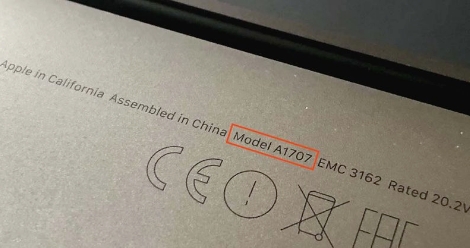
Check the model number on the bottom side of your laptop which will look something like "A2289"
| Year | Identifier | Model Number |
|---|---|---|
| 2020 13" (2 TB 3) | MacBookPro16,3 | A2289 (EMC 3456) |
| 2020 13" (2 TB 3) | MacBookPro16,3 | A2289 (EMC 3456) |
You can find your MacBook Pro model number printed on the bottom side of your laptop, near the rear hinge amounst the small print text. The model number follows the format “AXXXX”, where “A” is followed by four digits (e.g., A2289).
For a visual guide, check out our step-by-step instructions demonstrated here.
If you need any help finding the correct replacement key for your laptop please don’t hesitate to contact us.
Shipping Times and Services
United Kingdom (UK) Shipping
Europe Shipping
Global Shipping
Installation Guide
Watch or read our detailed installation guides which will teach you how to easily replace any keycap on your MacBook Pro A2289.
Replacement Key for Apple MacBook Pro A2289 – Turkish Layout
The replacement key for the MacBook Pro A2289 keyboard is a brand new replacement that comes with the black keycap and white scissor clip.
Check Compatibility
Check the model number on the bottom side of your laptop which will look something like "A2289"
| Year | Identifier | Model Number |
|---|---|---|
| 2020 13" (2 TB 3) | MacBookPro16,3 | A2289 (EMC 3456) |
| 2020 13" (2 TB 3) | MacBookPro16,3 | A2289 (EMC 3456) |
You can find your MacBook Pro model number printed on the bottom side of your laptop, near the rear hinge amounst the small print text. The model number follows the format “AXXXX”, where “A” is followed by four digits (e.g., A2289).
For a visual guide, check out our step-by-step instructions demonstrated here.
If you need any help finding the correct replacement key for your laptop please don’t hesitate to contact us.
United Kingdom (UK) Shipping
Europe Shipping
Global Shipping
Check Compatibility
Check the model number on the bottom side of your laptop which will look something like "A2289"
| Year | Identifier | Model Number |
|---|---|---|
| 2020 13" (2 TB 3) | MacBookPro16,3 | A2289 (EMC 3456) |
| 2020 13" (2 TB 3) | MacBookPro16,3 | A2289 (EMC 3456) |
Watch or read our detailed installation guides which will teach you how to easily replace any keycap on your MacBook Pro A2289.
Video Installation Guide
Follow along with our video guide to easily replace your MacBook Pro A2289 keycaps.
Related products
Product Reviews

Service was good, everything arrived in good condition. easy to install. only thing is that I paid as much in customs as I did for the keys (delivered in Belgium). So it ended up being a little bit more expensive than expected
Service was good, everything arrived in good condition. easy to install. only thing is that I paid as much in customs as I did for the keys (delivered in Belgium). So it ended up being a little bit more expensive than expected
Great customer support, very fast answer to your questions and totally Reliable. I recommend the "Mac Replacement Keys" to anyone who needs keys for computer.
Really helpful and knowledgeable, thank you for your help and know how
Excellent Service Fast Delivery Great Company
Great service and product, very happy customer.
Perfect product and shipment to me in France!
Service is fast and reliable.
