









Product Description
Protector your Apple MacBook Pro keyboard from wear with a thin rubber keyboard protector.
Check Compatibility
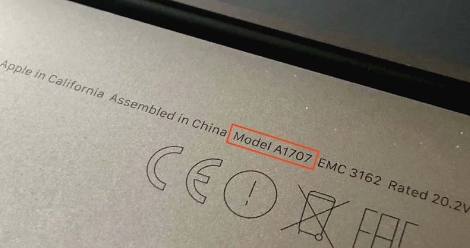
Check the on the bottom side of your laptop which will look something like "A1989"
| Year | Identifier | Model Number |
|---|---|---|
| Mid-2018 13" (Touch Bar)* | MacBookPro15,2 | A1989 (EMC 3214) |
| Mid-2018 13" (Touch Bar)* | MacBookPro15,2 | A1989 (EMC 3214) |
| 2019 13" (Touch Bar)* | MacBookPro15,2 | A1989 (EMC 3358) |
| 2019 13" (Touch Bar)* | MacBookPro15,2 | A1989 (EMC 3358) |
Shipping Times and Services
United Kingdom (UK) Shipping
Europe Shipping
Global Shipping
Installation Guide
Watch or read our detailed installation guides which will teach you how to easily replace any keycap on your MacBook Pro A1989.
- Replacing Letters, Numbers and Special Character keycaps
- Replacing the Enter keycap
- Replacing the Command keycaps
- Replacing the Tab keycap
- Replacing the Delete keycap
- Replacing the Caps Lock keycap
- Replacing the Spacebar keycap
- Replacing the Up Arrow keycap
- Replacing the Down Arrow keycap
- Replacing the Shift Right keycap
- Replacing the Escape keycap
- Replacing the F1 - F12 and Power keycap
Rubber Keyboard Protector for MacBook Pro A1989
£9.99
32 in stock
Protector your Apple MacBook Pro keyboard from wear with a thin rubber keyboard protector.
United Kingdom (UK) Shipping
Europe Shipping
Global Shipping
Check Compatibility
Check the on the bottom side of your laptop which will look something like "A1989"
| Year | Identifier | Model Number |
|---|---|---|
| Mid-2018 13" (Touch Bar)* | MacBookPro15,2 | A1989 (EMC 3214) |
| Mid-2018 13" (Touch Bar)* | MacBookPro15,2 | A1989 (EMC 3214) |
| 2019 13" (Touch Bar)* | MacBookPro15,2 | A1989 (EMC 3358) |
| 2019 13" (Touch Bar)* | MacBookPro15,2 | A1989 (EMC 3358) |
Watch or read our detailed installation guides which will teach you how to easily replace any keycap on your MacBook Pro A1989.
- Replacing Letters, Numbers and Special Character keycaps
- Replacing the Enter keycap
- Replacing the Command keycaps
- Replacing the Tab keycap
- Replacing the Delete keycap
- Replacing the Caps Lock keycap
- Replacing the Spacebar keycap
- Replacing the Up Arrow keycap
- Replacing the Down Arrow keycap
- Replacing the Shift Right keycap
- Replacing the Escape keycap
- Replacing the F1 - F12 and Power keycap
Video Installation Guide
Follow along with our video guide to easily replace your MacBook Pro A1989 keycaps.
Read Installation GuideRelated products
Product Reviews

Shipped to India flawlessly and saved me 800 dollars, even shipped it on international tracked so that the keycap doesn't get lost. Brilliant experience, highly recommend anyone who needs a keycap to shop here
Key came and worked nicely, not much else to say! Don't expect next day arrival but it was well packaged.
Really helpful and knowledgeable, thank you for your help and know how
Really helpful and knowledgeable, thank you for your help and know how
Great customer support, very fast answer to your questions and totally Reliable. I recommend the "Mac Replacement Keys" to anyone who needs keys for computer.
Service is fast and reliable.
Shipped to India flawlessly and saved me 800 dollars, even shipped it on international tracked so that the keycap doesn't get lost. Brilliant experience, highly recommend anyone who needs a keycap to shop here
Shipped to India flawlessly and saved me 800 dollars, even shipped it on international tracked so that the keycap doesn't get lost. Brilliant experience, highly recommend anyone who needs a keycap to shop here